“We Already Have Workforce Management Software.” But Do You Actually Have Absence Mitigation?
When organizations hear about absence mitigation, one response comes up frequently: “We already have workforce management software.”
Maybe it’s UKG, Workday, ADP, Oracle, SAP, Dayforce, Paycor, Paycom, or another HRIS, HCM, scheduling, payroll, or workforce management platform. These systems play an important role in managing employees, schedules, timekeeping, payroll, leave, and workforce data.
But having workforce management software does not necessarily mean you have a complete absence mitigation solution.
The distinction becomes clear when an employee unexpectedly calls off. Your workforce management system may know who was scheduled, maintain the employee’s information, and eventually record the absence. But the operational problem is happening right now. A supervisor needs to know. Attendance policies may need to be applied. Documentation needs to be captured. The shift may need coverage. Other employees may need to be contacted.
That gap between recording an absence and responding to it is where ProductivityPilot fits.
Workforce Management and Absence Mitigation Aren’t the Same Thing
Most organizations already have technology responsible for managing major parts of their workforce. The problem isn’t that those systems don’t work. The problem is expecting one platform to solve every operational challenge created by an unexpected absence.
Traditional workforce systems are often responsible for scheduling, employee records, timekeeping, payroll, leave administration, and other critical workforce functions. They help organizations understand who should be working, when they should be working, and what workforce activity needs to be recorded.
Absence mitigation addresses a different question: What happens when the employee who was supposed to work suddenly isn’t available?
That single event can create a chain reaction across an operation. Supervisors may need to rearrange staffing, HR may need to review attendance information, employees may need to be contacted for coverage, and operations leaders may need immediate visibility into how staffing has changed.
ProductivityPilot is designed to help automate and coordinate that response without requiring organizations to replace the workforce systems they already rely on.
The Real Test Is What Happens After the Call-Off
The easiest way to determine whether an organization has true absence mitigation is to follow an actual call-off from beginning to end.
Imagine an employee is scheduled to begin work at 7:00 a.m. At 5:30 a.m., they report that they will not be coming in.
What happens next?
In many organizations, the answer involves several people and several different systems. The employee may call a supervisor or hotline. Someone records the absence. Another person notifies operations. HR may need to review the employee’s attendance history. A supervisor begins searching for coverage. Text messages or phone calls go out to employees who might be available.
The organization has workforce technology, but people are still responsible for connecting the entire process.
ProductivityPilot is built to connect more of those steps into a centralized absence mitigation workflow.
It Starts With How Employees Report Off
Absence mitigation begins before an absence ever reaches a timecard.
When employees report absences through different channels, information can become fragmented. One employee calls a supervisor, another sends a text, another leaves a voicemail, and another contacts HR. Supervisors and HR teams are then responsible for gathering that information and making sure it reaches the right place.
ProductivityPilot’s Attendance Hotline provides a centralized process for employee call-offs. Instead of relying on scattered communication, absence information can enter a standardized workflow from the beginning.
That creates a stronger foundation for everything that happens afterward because the organization isn’t starting its response by searching for information.
Recording the Absence Doesn’t Notify Everyone Who Needs to Act
Once an absence is reported, the information often needs to move quickly. A supervisor may need to adjust staffing, operations may need to understand whether production will be affected, and HR may need documentation associated with the absence.
This is where simply having the absence stored in a workforce system may not be enough.
ProductivityPilot provides real-time notifications and supervisor alerts that help route absence information to the people responsible for responding. Rather than relying on one manager to manually communicate the call-off throughout the organization, notifications can become part of the workflow.
The objective is simple: reduce the distance between knowing someone is absent and doing something about it.
Attendance Policies Still Have to Be Applied
The administrative work surrounding an absence doesn’t end when the call-off is received.
Organizations may need to determine how the absence should be categorized, whether attendance points apply, whether an exception exists, what documentation is required, and what action should occur based on the employee’s attendance history.
At scale, those decisions can create substantial administrative work. They can also become difficult to execute consistently when different supervisors or locations are responsible for interpreting the same policy.
ProductivityPilot’s Policy Automation helps organizations turn attendance policies into standardized workflows. Instead of requiring managers to repeatedly interpret policy and manually determine the next step, rules can be incorporated directly into the absence process.
This is where absence mitigation becomes more than attendance tracking. The system isn’t simply recording what happened. It is helping determine and execute what happens next.
And the Shift Is Still Open
Even after an absence has been reported, documented, and processed correctly, the organization’s biggest operational problem may still be unresolved: someone was supposed to be working, and now they aren’t.
A supervisor may need to find another qualified employee, determine who is available, communicate the opening, manage overtime considerations, or rearrange the schedule. In union environments, the process may also need to account for seniority, eligibility, CBA requirements, or specific backfill procedures.
This is where the difference between absence tracking and absence mitigation becomes especially important.
Knowing that an employee is absent provides visibility. Helping the organization respond to the resulting staffing gap creates operational value.
ProductivityPilot’s backfill capabilities are designed to help organizations move from identifying the absence to addressing its impact.
The Hidden Problem Is Often the Work Between Systems
An organization can have sophisticated workforce technology and still rely heavily on manual processes.
The issue isn’t always a missing system. Sometimes it’s the amount of work employees are performing between systems.
A typical absence may still require someone to:
- Receive and document the call-off
- Notify the appropriate supervisors or departments
- Review attendance history and apply policy
- Capture supporting documentation
- Determine the staffing impact
- Identify potential coverage
- Communicate with available employees
- Follow union or CBA requirements when applicable
- Update the appropriate workforce records
If managers and HR teams are manually connecting those steps, there is still an opportunity to automate the absence response.
ProductivityPilot is designed to bring those processes together so an absence can trigger a coordinated workflow instead of a chain of administrative tasks.
“But Our Current System Already Tracks Attendance.”
It probably does, and ProductivityPilot isn’t designed to replace that capability.
The more important question is what your team still has to do after the attendance event occurs.
If your workforce system records an absence but a supervisor still has to make multiple phone calls, HR still needs to manually interpret policy, employees need to be contacted individually, documentation exists in different places, and coverage is coordinated separately, then the organization has successfully tracked the absence without fully mitigating it.
That distinction matters.
Attendance tracking tells you there is a problem. Absence mitigation helps you respond to it.
ProductivityPilot Works With the Technology You Already Have
Implementing absence mitigation doesn’t mean starting over.
Organizations have already invested in HRIS, HCM, workforce management, payroll, scheduling, and timekeeping platforms. Those systems often contain critical employee information and support essential business processes.
ProductivityPilot is designed to complement that existing technology environment rather than compete with it.
An organization can continue using its existing systems for the functions they already perform while adding specialized absence mitigation capabilities around them. ProductivityPilot can integrate into the workforce technology ecosystem so organizations don’t have to choose between their existing investment and improving their absence processes.
Your workforce management platform can continue managing the workforce. ProductivityPilot focuses specifically on mitigating the disruption created when employees don’t show up as expected.
What Does That Gap Actually Cost?
Consider a hypothetical operation with 500 hourly employees and an average unexpected absence rate of 3%. That would represent approximately 15 unexpected absences on a typical operating day.
If the organization estimates that each absence creates $150 in combined productivity loss, overtime, administrative work, or other operational impact, those absences would represent approximately $2,250 in daily impact.
Across 260 operating days, the estimated annual impact would be:
15 absences × $150 × 260 days = $585,000
This is an illustrative example rather than a universal benchmark. Actual absence-related costs vary by organization, industry, wages, overtime requirements, staffing structure, and the operational impact of an uncovered position.
The point is that the cost isn’t created because an organization failed to record the absence. The cost comes from the disruption the absence creates.
That is why mitigation matters.
From a System of Record to a System of Action
Most organizations already have systems that are very good at maintaining workforce records. Employee information, schedules, timecards, payroll information, leave records, and attendance history all need reliable systems behind them.
But an unexpected absence isn’t just a record. It’s an operational event.
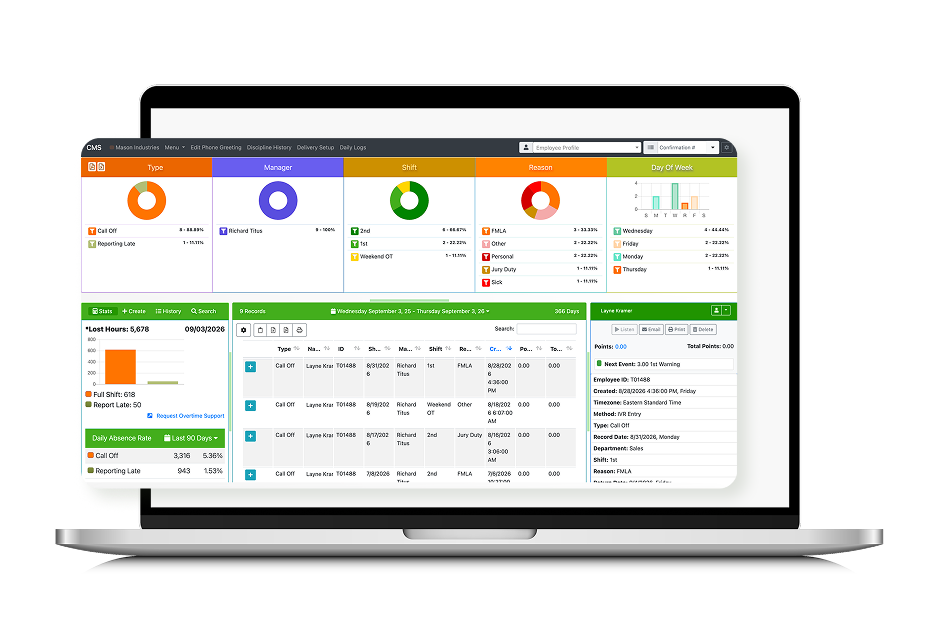
ProductivityPilot provides an additional layer focused on turning that event into action. Attendance reporting, notifications, policy automation, documentation, communication, and backfill can become parts of a connected workflow rather than separate tasks requiring manual coordination.
Instead of an employee calling off and managers determining what needs to happen next, the call-off can become the beginning of an established absence mitigation process.
That is the difference between simply knowing your workforce changed and being prepared to respond when it does.
Where ProductivityPilot Fits
ProductivityPilot brings specialized absence-related capabilities together while allowing organizations to maintain the workforce technology they already use.
Depending on the organization’s needs, those capabilities can include:
- Attendance Hotline and centralized call-off reporting
- Policy Automation and attendance point tracking
- Real-time notifications and supervisor alerts
- Centralized absence documentation
- Intermittent FMLA tracking
- Workforce communication
- Backfill workflows
- Union and CBA-related processes
- Dashboards and reporting
- Integration with existing workforce technology
The goal isn’t to duplicate everything your current workforce system already does. It is to address the operational processes that can remain manual even after those systems are in place.
How to Tell Whether You Actually Have Absence Mitigation
Don’t evaluate your absence process based solely on the software listed in your technology stack. Evaluate what happens during a real call-off.
When an employee reports an unexpected absence, look at how many manual steps occur before the issue is fully addressed. Look at how many people need to communicate, how many systems they need to access, how attendance policy is applied, and how the resulting staffing gap is handled.
If the process still depends heavily on phone calls, spreadsheets, emails, text messages, manual policy reviews, and supervisor intervention, there is likely still a gap between workforce management and absence mitigation.
Your existing workforce software doesn’t need to be replaced to close that gap.
It needs to be complemented by technology designed specifically for it.
You Have Workforce Management. Now Close the Absence Gap.
Having workforce management software is not the problem. In fact, those systems are an important part of the solution.
The question is whether your technology handles the entire operational response when an employee unexpectedly becomes unavailable.
If supervisors are still making calls, HR teams are still manually applying policies, employees are being contacted individually, spreadsheets are still involved, and open shifts still create a scramble for coverage, there is still work happening outside your workforce management system.
ProductivityPilot is designed to fill that gap by working alongside the technology you already have and connecting the workflows that begin when an employee calls off.
Your workforce software helps manage the workforce you planned for. ProductivityPilot helps you respond when the plan changes.